How to track brand mentions in ChatGPT (free and automated)

To track brand mentions in ChatGPT, pick the questions your buyers actually ask, run each one several times under the same conditions, save the full answers, and count how often your brand is named, recommended, and cited. Then rerun the same questions every week and compare.
Most people check their brand in ChatGPT the same way. They type “best [category] tools,” see three competitors and no sign of themselves, feel a small drop in the stomach, and post the screenshot in Slack. I understand the reflex. As data, though, that screenshot is close to useless, because if you ask the same question again in five minutes there’s a fair chance you’ll get a different list.
You can track brand mentions in ChatGPT for free with ChatGPT and a spreadsheet, and for a first audit I’d recommend you do. To save you building one from scratch, there’s a free ChatGPT brand mention tracker you can copy into your own Google Drive, with the columns, labels, and a summary tab already set up. Once it becomes a weekly job, a tool like Quotable can take over the collecting and the comparing. Neither one shows you other people’s private conversations. Both only ever measure the answers to the questions you chose to test, which is worth remembering every time someone quotes a percentage at you.
First, what are you actually counting?
Three different things tend to get lumped together as “a mention,” and they lead to different conclusions.
A mention is ChatGPT naming your company or product anywhere in the answer. A recommendation is narrower: the answer presents you as a good option for what the buyer asked. A citation is a link to a page, which may or may not be yours, and which can appear even when your brand is never named.
Take a question like “Which project management software is best for a 20-person design agency?” An answer that says “Consider [your brand]; its client approvals suit design teams” is a recommendation. One that says “[Your brand] is another option, although it lacks the approval features you asked for” is a mention, and arguably a worse outcome than silence, because it names you and then rules you out. And “For this use case, look at [competitor A] and [competitor B]” doesn’t mention you at all.
Each one sends you somewhere different. If you’re absent, the question is whether ChatGPT connects you with the category in the first place. If you’re named and rejected, check whether the reason it gives is true. And if your own page gets cited while someone else gets recommended, the page is doing useful work as evidence without convincing anyone the product fits.
The free way to track brand mentions in ChatGPT
You need ChatGPT, a couple of uninterrupted hours, and somewhere to log the answers. If you haven’t grabbed it yet, make a copy of the free tracker template now, because the steps below follow its structure and you can fill it in as you go. What you’ll get is a directional baseline for a defined set of questions. It won’t be a statistically representative picture of what every ChatGPT user sees, and you shouldn’t present it as one.
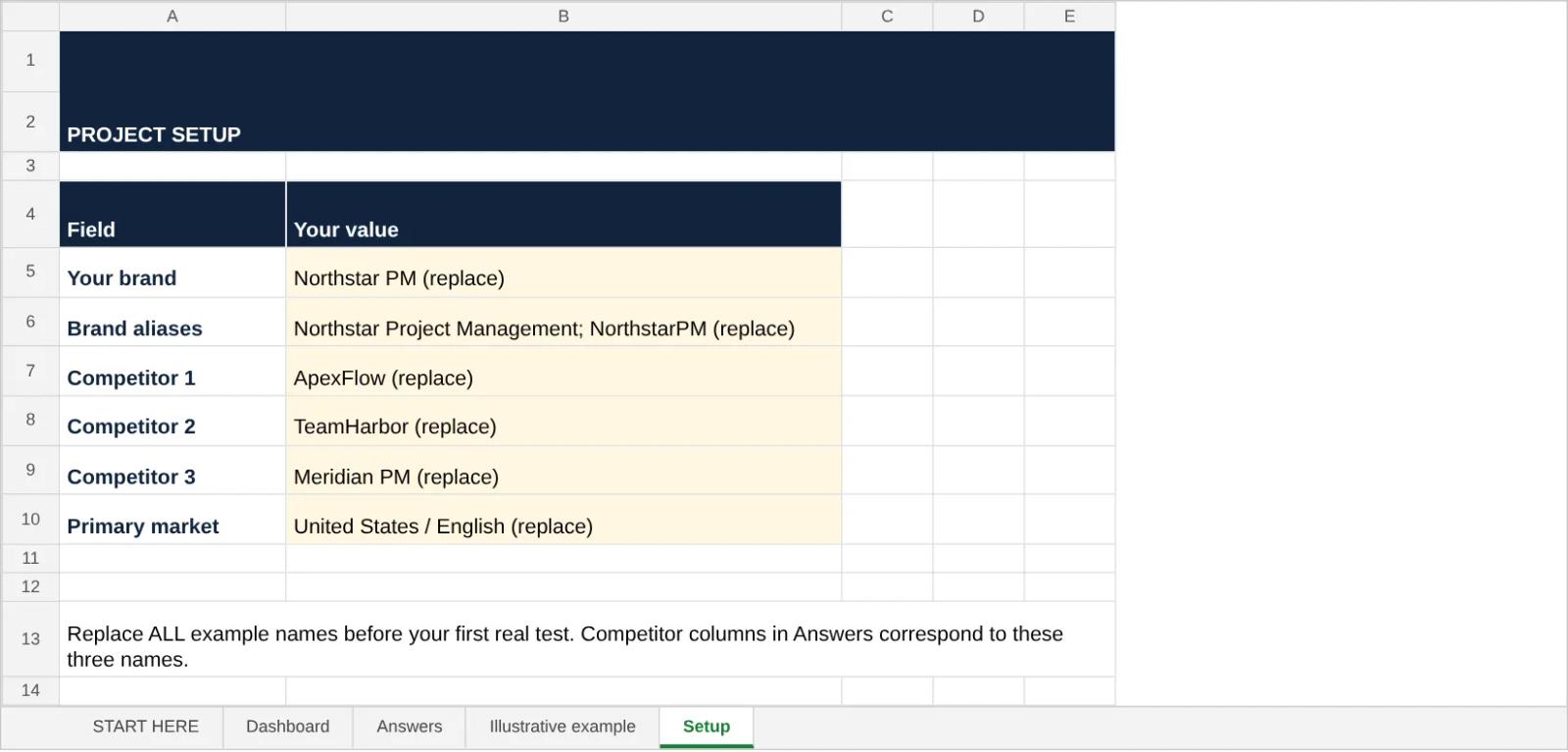
Start in the Setup tab before you run anything. Replace the example values with your brand, its aliases, exactly three competitors, and your main market and language, because the three competitor columns in the answer log and the dashboard follow that order. Keep those settings the same for as long as you track, or the trend line stops meaning anything.
Pick questions your buyers would actually type
Start with somewhere between 20 and 40 questions. The best ones come from sales calls, customer objections, support tickets, and site search, because those are the words buyers use when they don’t know your product yet. A set built from your own marketing copy will flatter you.
For a B2B reporting tool, a starting set might mix category questions (“What tools help agencies automate client reporting?”), use cases (“Which reporting software combines SEO and paid media dashboards?”), comparisons (“What are the best reporting platforms for agencies with ten clients?”), and hard constraints (“Which reporting platforms support client-specific permissions?”). That last kind is where shortlists change most, so don’t skimp on it.
Keep branded and unbranded questions in separate groups. “Is [your brand] good?” is a fine question for checking accuracy and objections, but it can’t tell you whether a buyer who’s never heard of you would find you. Your discovery numbers should come from the unbranded group only.
And give each buying intent enough questions to stand on its own. Twenty-five “best software” prompts and a single integration question won’t tell you anything about integrations. Note where each question came from, too, so whoever reviews the list can argue with it.
Choosing the questions well is a whole topic in itself, and our guide to choosing AI visibility prompts goes deeper. Here I’ll stick to measuring the answers.
Run them clean
Use a fresh chat for every run. Temporary Chat or a signed-out session cuts out most of the personalization and history effects, and incognito mode on its own isn’t enough if you’re still logged in.
For each run, write down the exact prompt, the date, the country and language, which ChatGPT experience and model you used, and whether a web search actually happened. ChatGPT decides on its own when to search, so “I didn’t ask it to search” isn’t the same as “no search.” Don’t ask follow-ups in the same thread either, since every follow-up answer has seen your previous question and stops being an independent test.
Model changes matter more than people think. GPT-6 started rolling out to paid ChatGPT plans on October 7, 2026, and anyone who compared September answers with mid-October answers was partly comparing two different models. Note the model on every row, and don’t mix consumer ChatGPT results with API results in the same trend.
Ask more than once (this is the part people skip)
ChatGPT isn’t a results page with fixed positions. The same question can return a different number of brands, in a different order, with different names in it. SparkToro’s research with Gumshoe, published in January 2026, found that full recommendation lists almost never repeated exactly, while the brands that showed up often across many runs still formed a clear pattern. The useful lesson is about method: frequency across runs means something, and position in a single answer doesn’t.
How many runs is enough? I don’t think anyone has a clean answer for every kind of prompt. For a best-answer or ranked-shortlist question, Rand Fishkin has suggested something like 60 to 100 runs if you want a reliable read, which is a research standard more than a weekly chore. For a free first audit, three runs per question is a reasonable compromise, as long as you label the results as directional. If one commercial question is driving a big decision, run that one many more times.
When you report, give the number of questions and the number of runs separately. Ninety answers from 30 questions run three times are 30 buying situations, and pretending they’re 90 makes the sample look bigger than it is.
Save the whole answer, every time. A screenshot of the brand names loses the sentence that says your pricing is confusing, or that you’re “a good budget pick” when you sell to enterprises. Save the cited URLs as well, because they change between runs and sometimes disappear entirely.
Log one answer per row
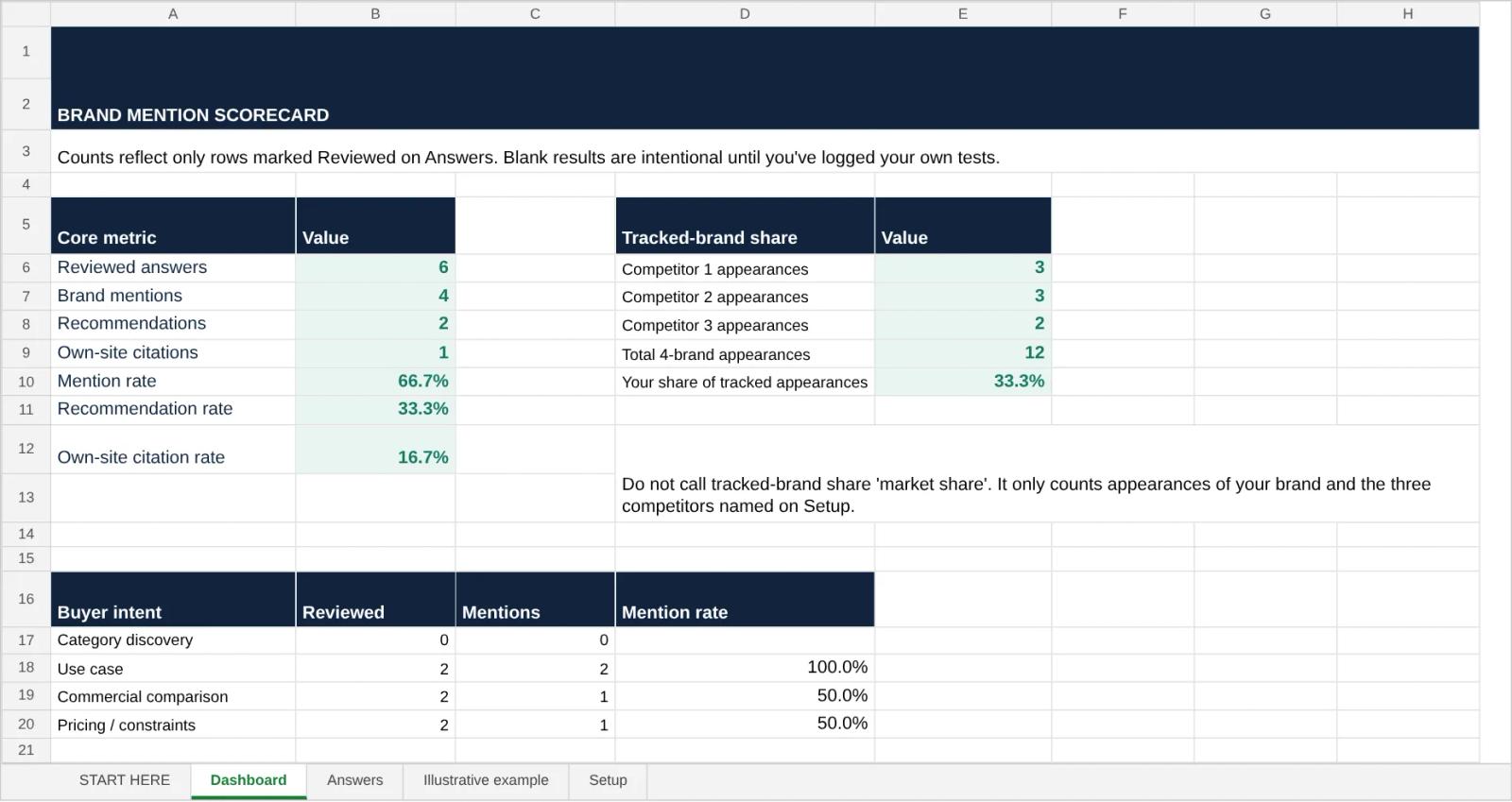
This is where the template’s answer log does most of the work. It comes with fixed labels, a summary tab, and an illustrative example tab of filled-in rows to copy from, and each row holds:
- the prompt ID, the question, its intent, and the market
- the date, run number, ChatGPT experience, and whether search was used
- the full answer, or a link to it, so someone else can check your label
- whether your brand was named, and a verdict: recommended, mentioned only, not named, or unclear
- the first recommended brand and your position, but only if the answer gave a real ordered list
- whether your site was cited, with the exact URLs
- whether each of your three tracked competitors appeared
- notes on accuracy, objections, and what you’d do about them
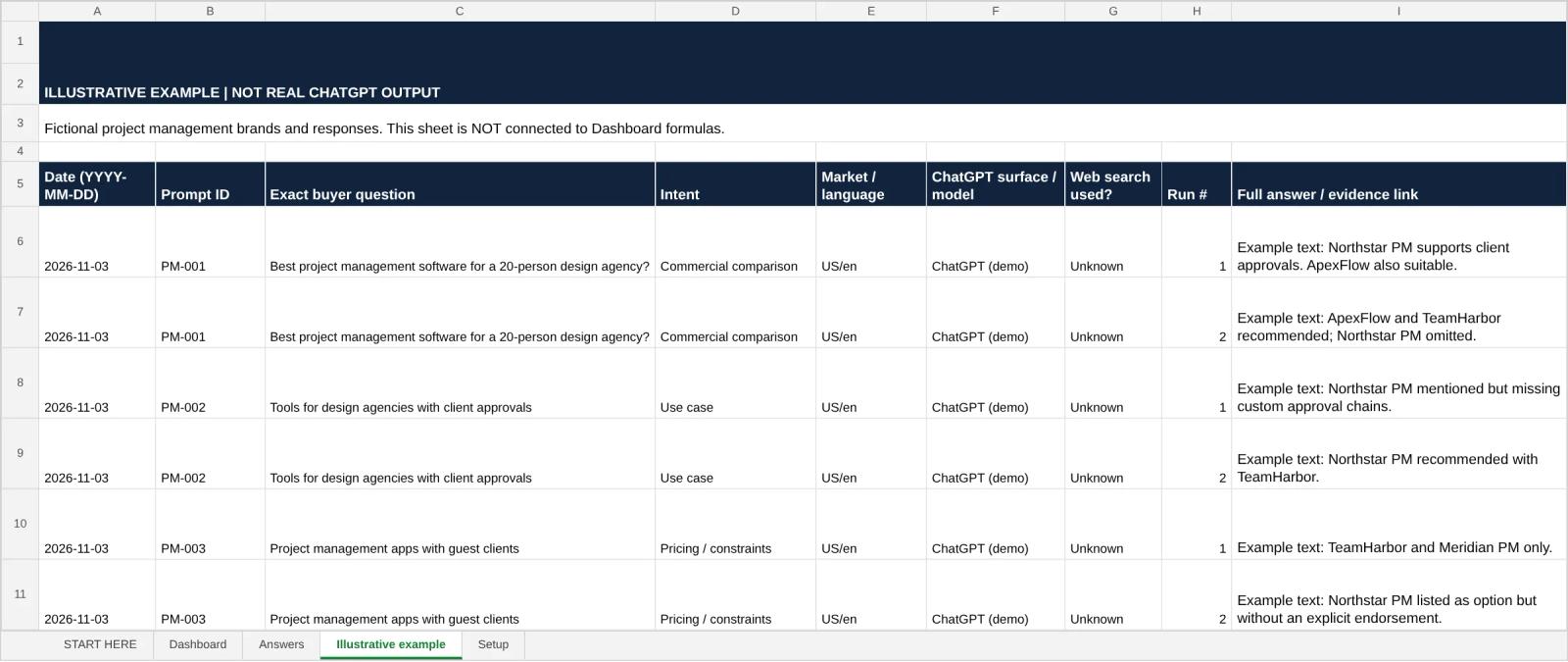
Settle your brand aliases before you start. A product rename, an acronym, or a parent company can create false matches, and if your name is an ordinary English word, read the sentence instead of trusting a text search.
When an answer is ambiguous, label it unclear rather than rounding it up to a recommendation. I’d rather have a boring, consistent rule than a flattering one. It also helps to have a second person label your first 10 to 15 answers on their own, then compare. You’ll disagree on things like “also worth considering,” and that’s the point: decide what that phrase counts as before you see which choice makes your score look better, and write the rule down.
Every row starts as Draft and only becomes Reviewed once you’ve checked the full answer, its claims, and its sources. The dashboard ignores drafts, so a half-labeled batch can’t quietly skew your numbers.

Come back to the same questions
Rerun the original set weekly, or more often if your product or your competitors are changing fast. New questions you discover along the way go into a separate group, otherwise your numbers can climb just because you added easier prompts.
Keep a dated log of what changed on your side, such as launches, price changes, new comparison pages, or corrected documentation. It gives you places to look when answers shift, though it can’t prove that any one change caused a new recommendation. And keep the weekly review small enough that you’ll actually do it: log the batch, recalculate, read every newly wrong answer, and pick no more than three gaps to look into. Going from 10 out of 30 to 11 out of 30 is one answer, and one answer is noise.
The free method’s weakness is stamina. Every extra prompt, market, model, and repeat run is more manual work, and most teams stop around week four.
The automated way to track ChatGPT brand mentions (and where I’m biased)
I build Quotable, so read this section knowing that. What a tool changes is the collection and the comparison. It doesn’t change the method, and anyone telling you their dashboard removes the need to read answers is selling something.
Quotable runs your prompts on a schedule, captures the answers client-side from ChatGPT itself rather than through the API, so you see what a buyer sees, and stores the full answers with their sources, the competitors named, and the history over time. You organize prompts by topic, intent, and segment, so a good score on broad awareness questions can’t hide a bad one on the purchase questions. It also checks the claims in each answer against your verified brand facts, which is how you catch the answer that names you and gets your pricing wrong.
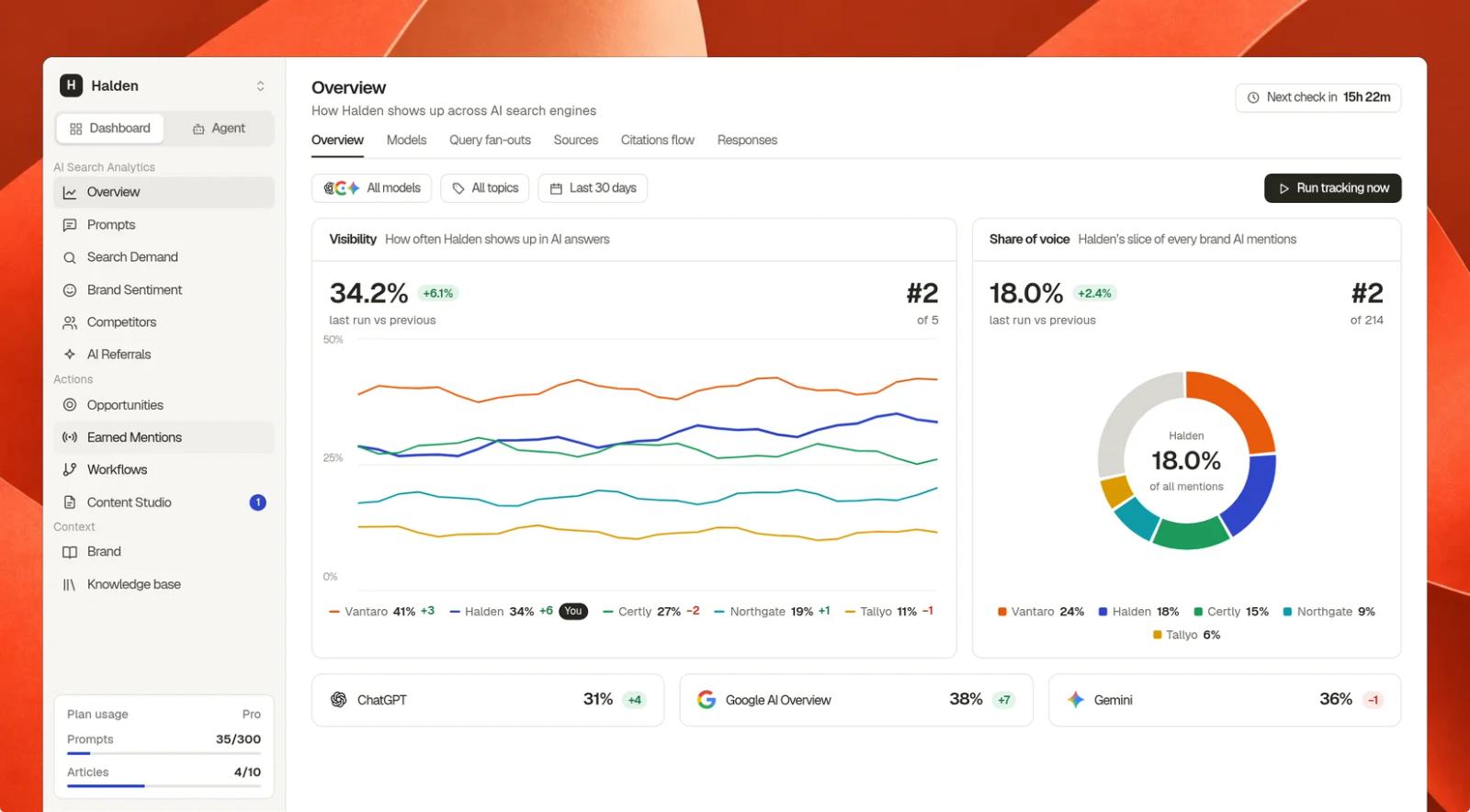
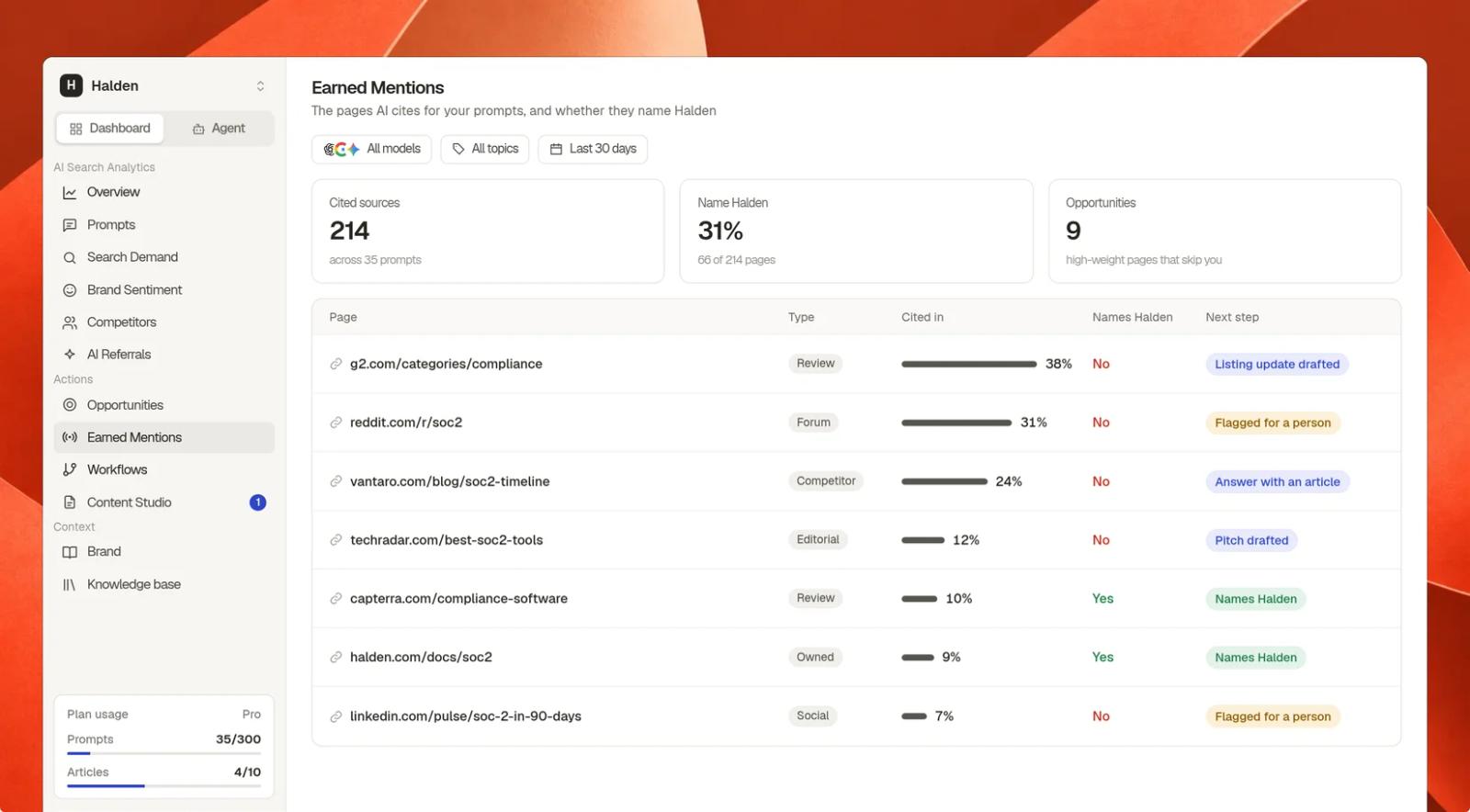
The part I’d actually point you to is what happens after you spot a gap. Say a tracked question asks “Which client-reporting platforms support localized dashboards for multinational agencies?” and your brand is missing while two competitors appear. In Quotable you’d filter the commercial questions to confirm the gap shows up across several runs, open the answers and the cited pages to see whether ChatGPT leaned on comparison articles, documentation, or an old listing, and then check the uncomfortable thing: does your product really support localized dashboards? If it doesn’t, the answer is right and marketing shouldn’t try to argue with it. If it does, you can ask Quotable Agent to draft the feature page update or the use-case example, use Tables to run the same fix across every affected page, and keep tracking the same questions afterward instead of celebrating one better answer.
It’s worth it when this is an ongoing responsibility: several product lines, client reporting, or weekly source investigations. If you only need to check a handful of questions once, the spreadsheet is enough, and I’d tell you that even if I didn’t build a tracker. Plans start at $99 a month, and you can try Quotable on your own prompts before deciding.
The numbers that make ChatGPT brand mentions useful
Calculate everything from the same set of valid responses, meaning the prompt ran, the answer was captured, and someone could classify it. Failed or half-finished runs get recorded separately, never counted as “not mentioned.”
| Metric | How to calculate it | What it tells you |
|---|---|---|
| Mention rate | Answers naming your brand ÷ valid answers | How often you were present |
| Recommendation rate | Answers recommending you ÷ valid answers | How often you were a real option |
| Own-site citation rate | Answers linking to your domain ÷ valid answers | How often your pages were used as sources |
| Share of tracked-brand appearances | Your appearances ÷ appearances of every brand in your tracked set | How visible you were next to specific competitors |
| Prominence and accuracy | Position in real ordered lists; reviewed claims and objections | How you were described when you were there |
Watch the denominators. Mention rate is per answer, while share of appearances is per brand appearance, and one answer can contain several brands. Neither one is the share of real ChatGPT conversations that mentioned you, and nobody outside OpenAI can give you that number.
If an answer is a discussion rather than a list, leave the position blank. Turning prose into a rank invents precision you don’t have.
Why 29% visibility tells you less than you think
Here’s a made-up example to show the math. A software brand tests 36 unbranded buyer questions three times each and ends up with 108 valid answers.
| What happened | Count | Rate |
|---|---|---|
| Brand named | 31 of 108 | 28.7% |
| Brand recommended | 12 of 108 | 11.1% |
| Own site cited | 9 of 108 | 8.3% |
| Share of tracked-brand appearances | 31 of 190 | 16.3% |
| Leading competitor named | 49 of 108 | 45.4% |
Put “29% AI visibility” on a slide and the interesting questions vanish. Why were there 19 answers that named the brand and didn’t recommend it? Why did one competitor appear in nearly half of them? Were the nine citations current product pages, or a two-year-old blog post? Mention rate on its own is the vanity metric of AI search, and I’d keep it out of any board deck that doesn’t also show the recommendation rate next to it.
If you use the template, its summary only counts rows marked as reviewed, and the share-of-appearances figure only covers the three competitors you entered, so it isn’t market-wide share of voice. Keep the example tab out of your real numbers.
None of this proves preference or revenue, either. Your prompts are a controlled sample, a recommendation isn’t a click, and a click isn’t a sale. Put these numbers next to whatever you can see about real outcomes, like referrals, qualified signups, sales conversations, and buyers telling you they found you through AI, and resist reading cause and effect into two lines that moved in the same month.
When competitors show up and you don’t
Filter for the high-intent questions where competitors appear and you don’t, then work out what kind of gap it is before you pick a fix. If competitors appear and you’re absent, look at which cited pages cover the category and whether they include you accurately. If you’re mentioned and dismissed, check whether the limitation it names is real. If old prices or features keep coming back, find the outdated page, yours or someone else’s. If your site is cited and you’re still not recommended, the page probably doesn’t say clearly who the product is for. And if you show up for general questions but vanish once a constraint is added, that constraint is where you need proof.
I’d prioritize by how much the question matters to buyers, then how consistently the gap repeats, then whether your product really fits, then whether you can do anything about the evidence. One missing mention on a purchase question outweighs ten extra appearances in conversations nobody buys from.
Be careful with outreach, too. A page ChatGPT cites a lot might be a neutral reference or a publisher with editorial rules, and you can’t just ask to be added. Make sure the source is relevant, that you meet its criteria, and that your change would make the page better for its readers. Anything paid gets treated separately and disclosed. And remember a citation only suggests where an answer found support. Editing that source won’t guarantee a future mention, and a missing mention can just as easily come from weak evidence, a poor product fit, a model update, or plain run-to-run variation.
Web search on or off?
Test with it, as long as you record when it actually happened and report the two kinds of answer separately. ChatGPT can answer from what the model already knows or go and fetch current pages, and since it often decides by itself, you can’t always force a clean comparison. OpenAI’s ChatGPT search documentation explains how search and citations work.
If you appear when the answer uses live sources and disappear when it doesn’t, look at the pages it retrieved. If it’s the other way round, check whether current information contradicts an older association. Neither pattern tells you what’s in the training data, and neither one predicts what every user sees. The rule I’d hold onto is simple: never merge different models, markets, or search conditions into one trend line without labeling them, because a change in conditions looks exactly like a change in performance.
Can Google Analytics see any of this?
Only a slice. Analytics can pick up some visits that come from ChatGPT links, but it can’t see conversations, and it can’t count a recommendation that didn’t produce a click. Plenty of people read an answer, close the tab, and search for you on Google later. Kevin Indig put the tension well in a LinkedIn post on AI measurement: “Executives ask for increased traffic in a growing zero-click environment.”
October 2026 showed how fragile even the referral slice is. From October 8, links in ChatGPT answers stopped carrying their tracking tag, so clicks landed in analytics as Direct traffic, and Search Engine Journal reported ChatGPT-attributed GA4 sessions falling by 22% to 57% on the sites Graphite tracks. OpenAI confirmed it was a bug, and a fix began rolling out on October 15. If your October report shows a ChatGPT collapse, annotate that week before anyone draws conclusions.
So measure three things and keep them apart: your presence in controlled AI answers, the AI-referred visits you can identify, and the buyers who tell you they used AI to find or evaluate you. They’re related, and none of them stands in for the others.
Before the next screenshot lands in Slack
Start with the free audit: questions your buyers would really ask, clean runs, full answers, and labels you’d defend to a skeptic. Then look past the headline number for where buyers would actually consider you, where the facts are wrong, and which gaps you can fix.
And the next time someone posts a screenshot of ChatGPT recommending three competitors, ask two things before anyone panics: how many times did you run it, and is that the question a buyer would actually type?
Frequently asked questions
Can I see how many times ChatGPT mentioned my brand to other people?
No. No public dashboard can count other people's private ChatGPT conversations. The spreadsheet method and every monitoring tool only see the answers they collect.
How many mentions should I aim for?
There's no universal target. Set a baseline on unbranded, commercially relevant questions, compare yourself with the same competitors on the same prompts, and watch recommendation quality and accuracy alongside the raw count.
How often should I check?
Weekly on a fixed set is a sensible place to start, and daily makes sense during a launch or when a category is moving fast. For a shortlist that really matters, more runs per question will tell you more than reading tiny daily changes.
Can I use ChatGPT to analyze the answers I saved?
Yes, and it's a decent shortcut for pulling out brand names, URLs, and possible errors. Check a sample by hand, though, because a model labeling another model's answers gets aliases, sarcasm, and lukewarm recommendations wrong more often than you'd like.
Written by